
 InstaCharts + Notion
Embed a Chart in Notion
Add a live, interactive chart to any Notion page
Notion pages hold team wikis, project docs, investor updates and client portals. An InstaCharts chart embedded in a Notion page stays connected to its spreadsheet, so the numbers on the page update when the data changes, and readers can hover over each point to see its value.
- Live and interactive
- Updates when your data changes
- Free plan available
Quarterly Sales Goal
Live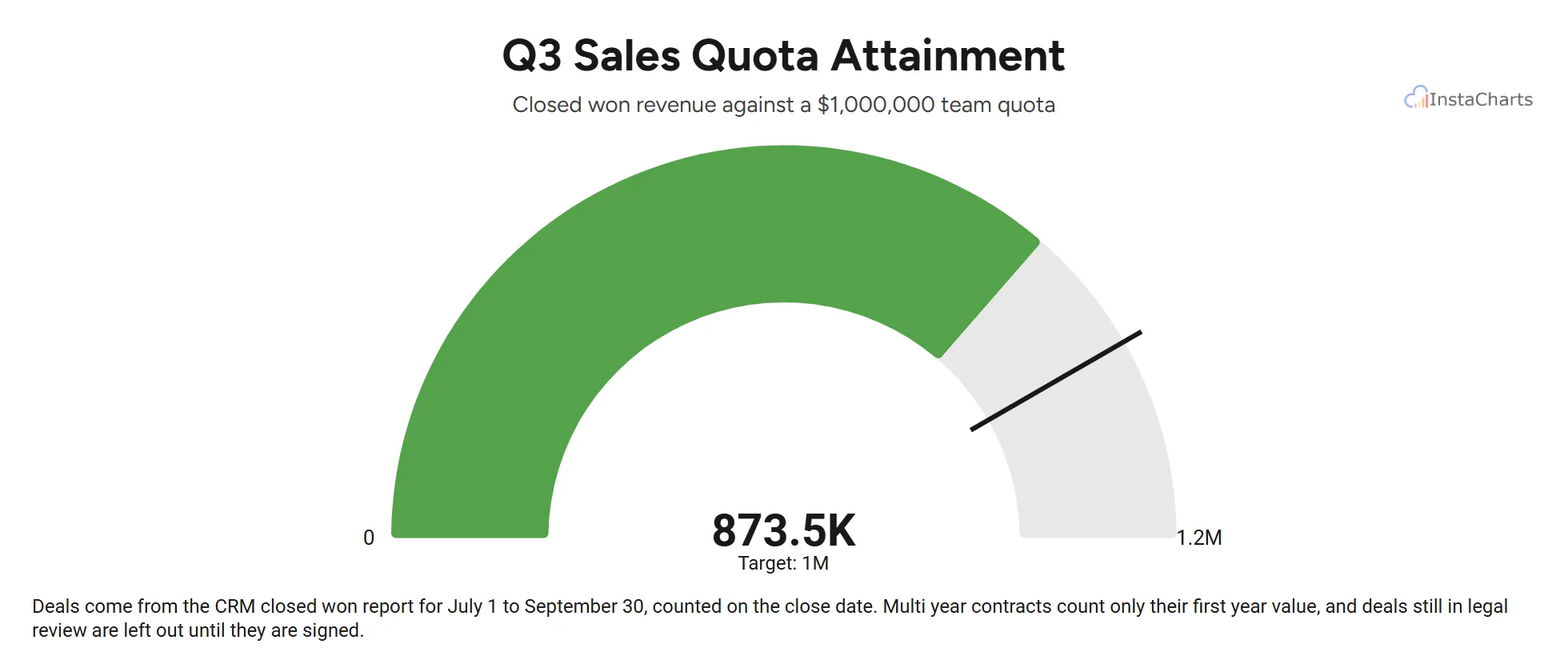
A live gauge chart embedded with InstaCharts, the kind of chart you can add to Notion. Hover over the chart to see each value.
Open TemplateAt a glance
What you need to embed a chart in Notion
An InstaCharts chart shared publicly, its Embed URL, and a Embed block on your Notion page.
Code to copy
Embed URL
Where it goes in Notion
Embed block
Updates
Automatic when the chart or its data changes
About Notion
What is Notion?
Notion is an all-in-one workspace from Notion Labs for notes, documents, wikis, databases and project tracking. Teams use it to plan work, write documentation and share updates in one place, and any page can be shared with teammates or published to the web. Notion's embed block shows content from other apps inside a page, which is how an InstaCharts chart appears in Notion.
Visit notion.comChart ideas
Charts that work well in Notion
Start from a template with sample data, then replace the rows with your own numbers and embed the chart in Notion.
Goal and quota progress
Track quarterly targets on a team page with a gauge that shows how close each goal is.
See the gauge chart templateProject budgets
Compare planned and actual spending in a project doc, board update or investor update.
See the grouped area chart templateTeam survey results
Share engagement survey answers on an HR wiki page as a Likert scale chart.
See the 100% stacked bar chart templateIn InstaCharts
Make the chart and copy its embed code
Step 1
Add your data
Upload a CSV or Excel file, paste a table, import a file from a web link or connect a Google Sheet. InstaCharts reads your columns and suggests a chart.
To add a new sheet, launch the Add New Sheet dialog. There's a few ways to import your data, the easiest is Blank Sheet. In the empty spreadsheet on the Blank Sheet page, paste in your data straight from Excel. Click Next to see a data preview, then click Import. InstaCharts then draws a chart from the data automatically.
Step 2
Pick and style the chart
Choose the chart type and the columns for each axis, then set the title, colors and labels. Charts made from a synced Google Sheet or web link keep updating.
Easily change the shape of the chart using the Chart Type dropdown. Here, we are changing from a bar chart to a pie chart. Use the right click menu to show data labels on the pie chart, and to hide the legend. Finally we will change the chart theme and color scheme to get our chart to match our website.
Step 3
Share it and copy the Embed URL
Click Share on the toolbar, choose Share Chart and set the share mode to Public. Under Embed in a webpage, copy the Embed URL.
Click Share on the toolbar to open the Share & Templates dialog. Change the pie chart's share mode to Public. Under the Embed in a webpage section, copy the Embed URL, the plain web address for the chart.
In Notion
Add the chart to Notion
Paste the Embed URL into a Embed block.
- 4
Step 4
Add an embed block
Open the Notion page, click where the chart should go and type /embed. Choose Embed from the menu.
- 5
Step 5
Paste the Embed URL
Paste the Embed URL you copied from InstaCharts into the link box and click Embed link. The chart loads inside the block.
- 6
Step 6
Resize the block
Drag the handles on the sides and bottom of the block to set the chart's width and height. Make the block tall enough to show the whole chart and the embed toolbar.
What the Embed URL looks like
Copy your own code from the Share dialog. YOUR_CHART_ID stands for the id InstaCharts gives your chart.
https://instacharts.io/app/embeds/YOUR_CHART_IDTips
Tips for charts in Notion
- Use the Embed URL in Notion. Notion's embed block takes a web address, and the Embed Tag is HTML code meant for website builders.
- Turn on Full Dataset or Plotted Data in the Settings tab of the Share dialog to let readers switch between the chart and a sortable data table inside the same block.
- Turn on Match Toolbar to Chart in the Settings tab when the chart has a dark background, so the embed toolbar matches the chart on dark mode pages.
- Anyone who can open the Notion page sees the chart, including pages published to the web, because the chart is shared publicly.
FAQ
Embedding charts in Notion: FAQ
Answers to common questions about adding InstaCharts charts to Notion.
Can I make a chart from a Notion database?
Yes. Export the database as a CSV file from Notion, then upload the CSV to InstaCharts and pick a chart. When the database changes, export a new CSV and use Update Sheet in InstaCharts to replace or append the rows, and the chart in Notion shows the new data.
Why does the Notion embed block show a blank area?
The chart is most likely set to Private. Open the Share dialog in InstaCharts and set the share mode to Public. If Domain Whitelisting is on, turn it off for charts embedded in Notion, since the whitelist only allows the domains you list.
Can I embed an InstaCharts dashboard in Notion?
Yes. Open the dashboard's Share dialog, copy its Embed URL and paste it into a Notion embed block the same way as a chart. Make the block tall enough to show the dashboard.
Does an embedded chart update when my data changes?
Yes. The embed loads the chart from InstaCharts each time the page opens, so changes to the chart and new data from a synced Google Sheet, a web link or Zapier show up with no new embed code.
Is it free to embed a chart?
Yes. The free plan includes 200 share and embed views a month, and free charts show an InstaCharts watermark. Paid plans remove the watermark and raise the limit to 1,000 views a month on Starter and 100,000 on Pro.
Can I embed a data table or a dashboard?
Yes. Turn on Full Dataset or Plotted Data in the Settings tab of the Share dialog to add sortable table views to the chart embed. Dashboards have their own Share dialog with an Embed URL and Embed Tag.
Can I see where my chart is embedded?
Yes, on paid plans. The Analytics tab of the Share dialog counts embed views apart from share link views and lists the top pages that load the chart.
Want the full reference?
Read the embed charts documentation for sizing, the embed toolbar, SEO options and domain whitelisting.
Explore
Embed a chart on another platform
Step by step guides for every website builder and app InstaCharts covers.
- Embed a Chart in WordPress
- Embed a Chart in Webflow
- Embed a Chart in Wix
- Embed a Chart in Squarespace
- Embed a Chart in Ghost
- Embed a Chart in Shopify
- Embed a Chart in Bubble
- Embed a Chart in Google Sites
- Embed a Chart in Framer
See which embed code each platform needs on the embed a chart page.
Make a chart for your Notion page
InstaCharts makes data visualization easy, so you can build clear reports without design experience.